
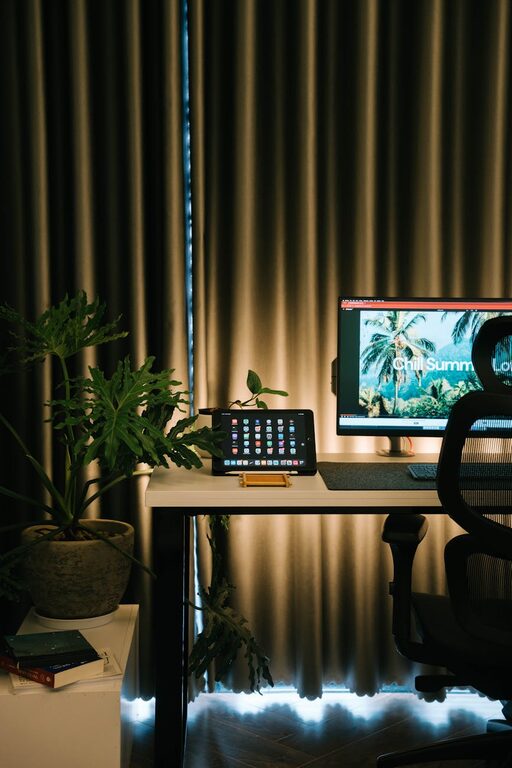
Creating a home office that feels cozy while also boosting productivity can transform the way you work and help maintain a healthy balance between comfort and focus. Whether you’re working remotely full-time or need a dedicated space for occasional tasks, setting up the right environment is essential. Below are practical tips to help you craft a home office that is inviting and efficient.
1. Choose the Right Location
Finding the best spot for your home office is the first step to creating an ideal workspace. Consider these points:
– Natural Light: Choose a space with plenty of natural light, as sunlight improves mood and focus.
– Quiet Corners: Pick a quiet area away from common household noise to minimize distractions.
– Space Availability: Ensure the space is big enough to accommodate your desk, chair, and any equipment or storage you need.
Remember, if space is limited, even a small nook can be transformed into a functional office with smart design choices.
2. Invest in Comfortable Furniture
Comfort directly impacts productivity. Here’s what to consider:
– Ergonomic Chair: Select an adjustable chair with good lumbar support to maintain proper posture.
– Desk Height: The desk should be at a comfortable height to avoid strain on your arms and wrists.
– Adjustable Desk Options: Consider a sit-stand desk to alternate between sitting and standing throughout the day.
Comfort reduces fatigue and helps you stay focused longer.
3. Optimize Lighting
Good lighting makes a huge difference in your workspace’s comfort and functionality.
– Combine Natural and Artificial Light: Use daylight when possible, supplemented by adjustable desk lamps.
– Avoid Harsh Fluorescents: Opt for warm light bulbs which create a cozy atmosphere without eye strain.
– Position Positioning: Place your desk perpendicular to windows to avoid glare on computer screens.
Proper lighting reduces eye strain and contributes to a calming environment.
4. Organize Efficiently
A clutter-free workspace promotes clear thinking and productivity.
– Use Storage Solutions: Invest in shelves, filing cabinets, or storage boxes to keep paperwork and supplies organized.
– Desk Accessories: Use trays, pen holders, and cable organizers to keep the desktop tidy.
– Declutter Regularly: Set aside time weekly to clear out unnecessary items.
An organized space saves time and reduces stress.
5. Personalize Your Space
Adding personal touches makes your office a welcoming place.
– Decorate with Plants: Indoor plants add color and improve air quality.
– Incorporate Art and Photos: Display images or art that inspire you.
– Use Textiles: Add a soft rug, cozy blanket, or cushions to make the space inviting.
Personalization boosts mood and creativity.
6. Manage Technology Smartly
Technology is essential but should be managed to avoid distraction.
– Use Wireless Devices: Wireless keyboards, mice, and headphones reduce cable clutter.
– Organize Cables: Use clips or cable sleeves to keep cords neat.
– Ensure Reliable Internet: A stable connection prevents interruptions.
Efficient tech setup allows for smooth workflow.
7. Control Temperature and Air Quality
Physical comfort includes the right temperature and fresh air.
– Maintain Comfortable Temperature: Use fans, heaters, or air conditioning to stay comfortable year-round.
– Improve Air Circulation: Open windows when possible or use an air purifier.
– Avoid Poor Ventilation: Stuffy air can lead to tiredness and reduced concentration.
Good air quality supports sustained focus.
8. Set Boundaries and Routine
Creating a cozy and productive home office is more than setup—it’s about habits.
– Define Work Hours: Set clear start and end times to avoid burnout.
– Communicate Boundaries: If you share your living space, let others know your working schedule.
– Take Breaks: Incorporate short breaks to stretch and refresh your mind.
Boundaries help maintain a healthy work-life balance.
Conclusion
Designing a home office that is both cozy and productive takes thoughtful planning and attention to comfort, organization, and personal preferences. By carefully choosing your location, investing in ergonomics, managing lighting and technology, and establishing routines, you can create a space that makes working from home a pleasure. Remember, your workspace should support both your well-being and your work goals — a place where focus and comfort come together seamlessly.